We focus on providing high quality batteries and related accessories. This New
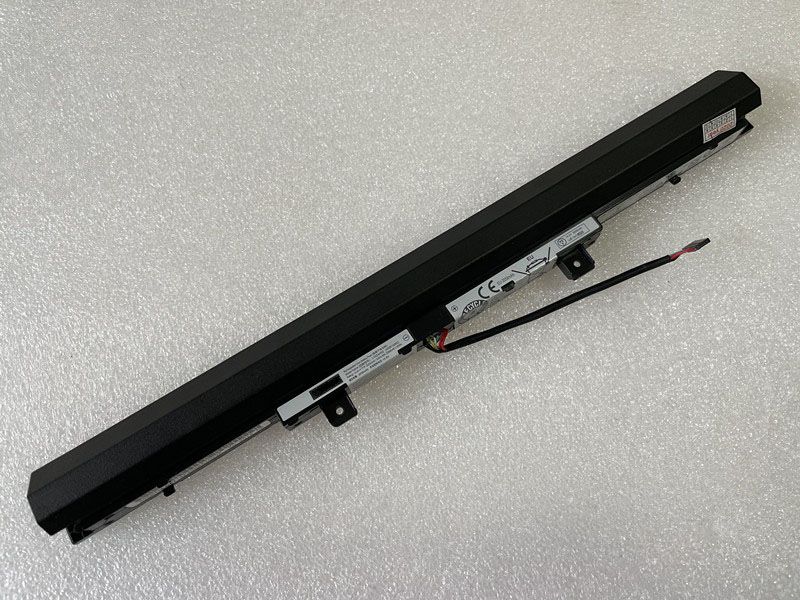
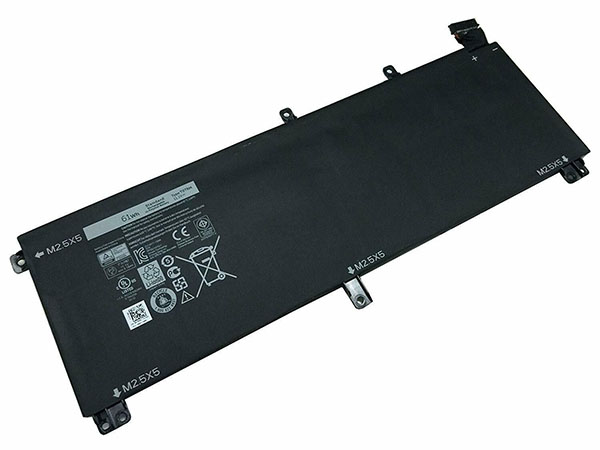
T0TRM Laptop Battery for Dell XPS 15 9530 Precision M3800 is designed for long-lasting and stable performance. It provides a one-year warranty and has passed CE / RoHS / ISO9001 safety certification. Fast delivery and thoughtful after-sales service will make you feel assured to purchase.
Brand: DELL Laptop BatteryReplaceable with the following models: T0TRMRechargeable battery type : Li-ionColor: BlackCurrent : 61WH/6cellsVoltage : 11.1VCapacity : 61WHEncoding : DEL19D815Supported models : T0TRM 0H76MY H76MV 07D1WJ 7D1WJ Y758WDELL T0TRM compatible Laptop Battery model:
Dell XPS 15 9530
Dell Precision M3800
Not compatible 91Wh batteryOnline store:
UK:DELL T0TRM Laptop BatteryAT:DELL T0TRM AkkusFR:Batterie pour DELL T0TRMIT:Batteria DELL T0TRMES:Baterías para DELL T0TRMDE:Akku für DELL T0TRMJP:DELL T0TRM 互換 バッテリーDELL Battery
DELL T0TRM Laptop Battery
Compatible with Dell XPS 15 9530 Precision M3800 battery
Brand: DELL Battery Capacity/Voltage : 61WH/6cells 11.1VDELL WD52H Laptop Battery
Compatible with Dell Latitude 12 7000 E7240 E7250 battery
Brand: DELL Battery Capacity/Voltage : 6000mAh/45WH 7.4VDELL HK6N5 Laptop Battery
Compatible with Dell Inspiron 13-5390 XPS 9370 9380 5390 battery
Brand: DELL Battery Capacity/Voltage : 45WH 7.6VDELL DT9XG Laptop Battery
Compatible with DELL Alienware Area-51m ALWA51M battery
Brand: DELL Battery Capacity/Voltage : 90Wh 11.4VDELL 266J9 Laptop Battery
Compatible with Dell G3 15 3590 15PR-1648BR 15PR-1742BR 15PR-1745W battery
Brand: DELL Battery Capacity/Voltage : 4255mAh/51Wh 11.4VDELL 4M529 Laptop Battery
Compatible with DELL E6410 E6400 E6500 E6510 battery
Brand: DELL Battery Capacity/Voltage : 8100mAh/90Wh 11.1V/10.8V(9cells)DELL E6410B6C32 Laptop Battery
Compatible with Dell Latitude E6400 E6510 E6500 M2400 PT434 W1193 M4400 battery
Brand: DELL Battery Capacity/Voltage : 6700mAh/74WH 11.1V/10.8VDELL V1P4C Laptop Battery
Compatible with Dell Chromebook 13 3380 battery
Brand: DELL Battery Capacity/Voltage : 7000mAh/56WH 7.6V This is the Replacement DELL T0TRM Battery, You can extend the life of your laptop battery significantly through the proper care and handling of your battery.
1. Any new T0TRM battery should first be fully charged by leaving it plugged in overnight. Once a computer battery is fully charged it will no longer accept any more power. It is a common practice to leave laptops plugged in after they have been turned off so that the battery has a full charge the next time you use your laptop. It is probably fully charged within 5 hours.
2. A brand new T0TRM notebook battery is in a weakened condition since it has not been conditioned yet. Condition and break in your new battery by performing 5 partial discharge and recharge cycles the first week you receive your new battery.
3. Run on battery power without the AC adapter cord at least once a week to keep the T0TRM battery cells active and at their peak potential. When your laptop is plugged into the power adapter the battery goes to 'standby mode' while your laptop runs directly on electricity from the wall outlet.
4. Even though your battery indicates it is fully charged, your battery will return to a weakened state again in a few months if it does not get some exercise through partial discharge and recharge cycles while running on battery power alone.
5. If your T0TRM battery has not been actively used 2 months or more, condition your battery again with 5 partial discharge & recharge cycles to increase the batteries capacity and run time.
6. Don't run your battery all the way to empty. Your battery will have a longer service life if it receives shallow discharge and recharge cycles. Research has shown that the useful life of the battery will be much longer if you begin to recharge the battery any time before reaching 20% of the remaining power capacity. Recharging the T0TRM battery even after 10 minutes will not reduce the battery's life span as lithium batteries do not have the memory effect which was found in older NiCad battery technology. NiCad batteries have never been used in laptops, even the earliest models.
7. Never run your battery below the 2% critically low warning point. If your battery is run below this point it may not have enough energy to even recharge. This may effectively 'kill' your T0TRM battery.